Building an Offline Record for Off-Grid Infrastructure
TL;DR
I have lived off the grid on Hawaii Island for 25 years. I assembled my power system over that time, and the record of it lived in a shoebox of receipts and my memory. I built GRID COMMAND at minigridmap.com to be the record I needed: every component by its label, what feeds what, and the manuals, all on my phone with no signal. It requires no account and keeps your data on your device. I built it for myself and then opened it to other owners and their AI agents.
The Problem
You need the fuse rating at the worst possible moment. You are on a ladder after dark in the rain, with one bar of signal or none. My system includes 1,780 watts of solar, a 60 amp charge controller, a 314 amp-hour lithium bank, and a 3,000 watt inverter. None of the monitoring apps that came with the hardware knew about any of the others. There was no single place that detailed what I owned, how it was wired, or which number on a spec sheet was actually verified.
Why It Mattered
An off-grid system that is not documented is a system only one person can maintain. That person forgets. It cannot be handed to an electrician or claimed on a warranty. A figure off a spec sheet and a figure you measured with a clamp meter are not the same kind of fact. Treating them as if they were is how systems get mis-sized.
The Solution: Step-by-Step
Step 1: Document the System Honestly
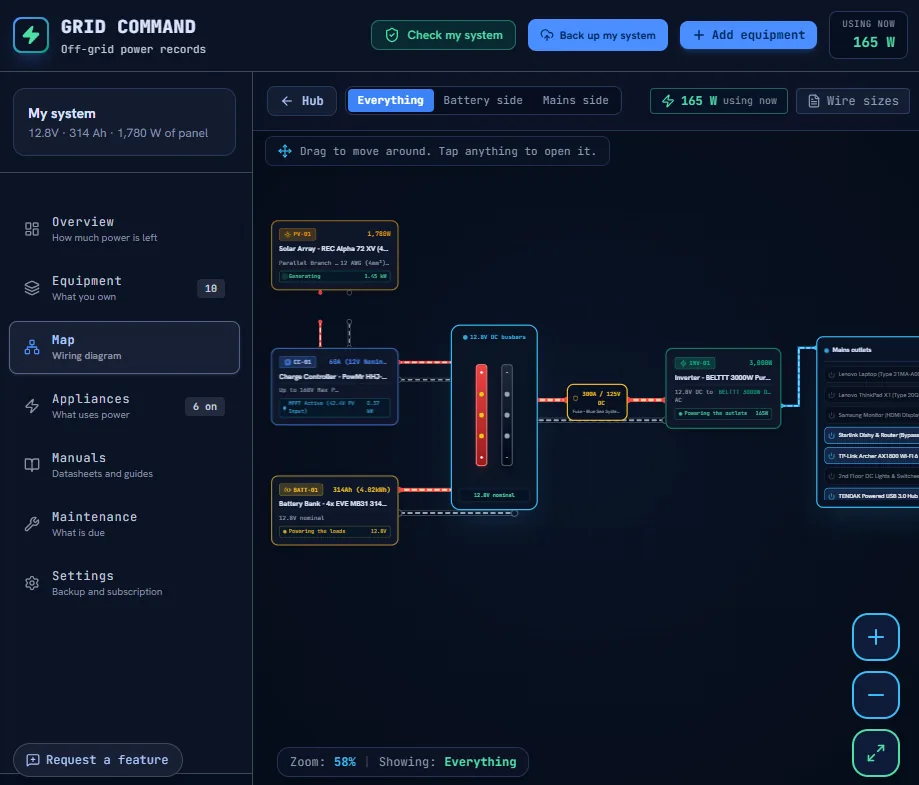
I photographed and dictated every component on my property and put it in the app. The system provides six views: overview, equipment, wiring, appliances, manuals, and maintenance.
- Every component carries its label code, nameplate figures, serial, and install date.
- The wiring map is drawn from the components you actually own.
- Each value states where it came from: read off the label, measured, worked out, or from the manual. If you have not said, the app shows nothing.
Step 2: Make It Work Without Signal
There is no signal at the array. I engineered the app as an installable web application that precaches every screen, so you can open every view off the grid.
- The app runs in the browser and works with the radio off.
- There is no account to create and nothing to cancel. Your data never leaves the device unless you ask.
- Manuals are real PDF files stored directly on the device.
Step 3: Remove Bias From the Hardware
The app originally assumed every user had the exact same system as me. I had to strip my own hardware out so a van owner with a 200 amp-hour bank is not shown a homestead's numbers as facts.
- Every figure now derives strictly from the owner's own components. A missing value is a dash, never a plausible default.
- Template values are tagged as estimates and carry no serial numbers.
- The safety check shows nothing until it has actually run.
Step 4: Integrate AI With Strict Boundaries
You can ask your system a question in your own words, and it looks for mismatches between your components. It is a second opinion, not an electrician.
- The tool answers only from your data and names the missing field rather than guessing.
- It says plainly when something requires a licensed electrician.
- The equipment list goes to the server and on to Gemini to be answered, but nothing is stored.
Step 5: Survive a Lost Phone
I built an export feature that writes one zip file containing every component, appliance, log, maintenance task, photo, and manual. Off-device backup is optional. A lost phone or a cleared browser is not a lost system.
- One zip file returns photos and PDF files identical to the originals.
- Customer backups live in a versioned storage bucket, not on the app server.
Key Metrics
6
Views over one system
None
Account required
Yes
Works offline
100 / 100
PageSpeed (Desktop and Mobile)
Key Technical Stack
The Result
My own system is fully documented in it. A stranger with a van or a cabin now starts from their own equipment and sees only their own numbers.
Most of what I believe about infrastructure I learned from a water tank, not from a vendor. You must build systems that hold up when the environment turns against you.
Open it, or have me build the record your business is missing
GRID COMMAND requires no account. If your business runs on a system that lives in one person's head, I build the record that gets it out.
To ensure my clients get the results they need, I maintain a strict boundary in how I operate. Tactics are hourly. Strategy is retainer only. If your business is ready to stop losing money on outdated tech and start operating at peak efficiency, the time to act is now.